
Meet FrogBot 2.0
Meet FrogBot 2.0, FrogPilot’s AI help assistant, on both the FrogPilot Discord and the FrogPilot website.
- Published
- Read time
- 8 min
- Views
- Author
FrogsGoMoo
Smarter. Better. Faster. Stronger. It’s FrogBot 2.0!
The first FrogBot ran on Google’s “Gemini 3 Flash”, and while it tried its best, bless its little heart, FrogBot 2.0 runs on Anthropic’s latest “Claude 5.5” models, and, well, saying it’s a lot smarter would be an understatement!
Even better, it improves on its own, learning from its conversations a lot like a person would! It picks out the questions it had a hard time with and works out better answers for next time, testing each one before it ever uses it. So the more people use it, the more accurate and reliable it gets!
And it doesn’t treat you like just another user either. FrogBot remembers your car, your comma device, the FrogPilot settings you tell it about, and the branch you’re on, so its answers fit your setup instead of some generic one.
You’ll find it in the FrogPilot Discord and right here on the FrogPilot website. It never pretends to be a person, but it’s still an AI, so it can get things wrong. If something it says doesn’t add up, tell it! That’s how it learns, and you can always give me a shout in the Discord too.
Ask it anywhere
In the Discord, you don’t even have to ask it! FrogBot keeps an eye out for FrogPilot questions and jumps in on its own when it can help.
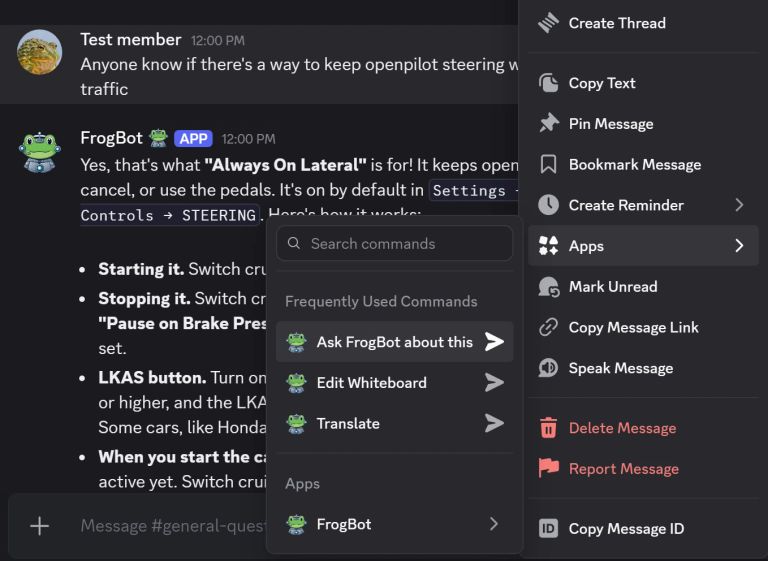
You can also mention @FrogBot or use /frogbot ask with your question, and to ask about something someone else posted, right-click the message, or long-press it on your phone, and pick “Ask FrogBot about this” under “Apps”. Moderators can quiet it in a channel or everywhere with /frogbot_mute.
On the FrogPilot website, it’s always one tap away! Hit the “Ask FrogBot” button with FrogBot’s face in the bottom-right corner of any page, and the chat opens right on the page you’re reading. On a post like this one, the chat has an “Ask about this post” option, and every post ends with an “Ask FrogBot about this post” button, or you can head straight to FrogPilot.com/frogbot. You don’t need an account to use it, though signing in gets you more messages a day.
It knows FrogPilot inside and out
FrogBot learns FrogPilot straight from the source. It knows every setting, with what it does, its default, and the “Tuning Level” it shows up at (the higher your “Tuning Level”, the more settings you see), along with every supported car, the alerts you might see on screen, each branch’s README, and every page and post on the FrogPilot website. It covers the “FrogPilot”, “FrogPilot-Staging”, and “FrogPilot-Testing” branches, and it updates itself whenever one of them changes or a new post goes up, so it’s never stuck on an old version!
It even knows FrogPilot’s images and sounds, from what each icon looks like to what each sound is and when your device shows or plays it. So if your screen shows an icon you don’t recognize, or your device makes a noise you can’t place, just describe it and FrogBot will tell you what it is!
Or skip the describing and just show it! In the Discord, FrogBot can look at screenshots, photos, and short video clips, listen to voice messages, and read log files and PDFs. On the website, you can attach a screenshot or a log while you’re working through a bug or a problem.
It also reads the official announcements in the Discord, along with answers from me and the members with the “openpilot Developer” role, so it picks up the stuff that never made it into a README.
In the Discord, your roles give it a good idea of your car’s make, your comma device, and your branch, and you can change them anytime in “Channels & Roles” near the top of the channel list, so its answers keep up with your setup. Link your device to your account on the FrogPilot website and it knows your device and branch for sure. Tell it which settings you’re running and it remembers them, or turn on “Let FrogBot use my device’s settings” under My account → My FrogBot, which is off until you turn it on, and it reads them from the latest stats your linked device sent, as long as that device has “Share FrogPilot Data” on.
Answers you can follow
FrogBot doesn’t just dump a wall of text on you. On the website, instructions with a few steps come as numbered steps you can follow one at a time, and when an answer points you to a setting, you get a card with what it does, its default, and exactly where to find it, with the menu path ready to copy. Longer details tuck away until you want them, and follow-up buttons under an answer let you ask the obvious next question with one tap.
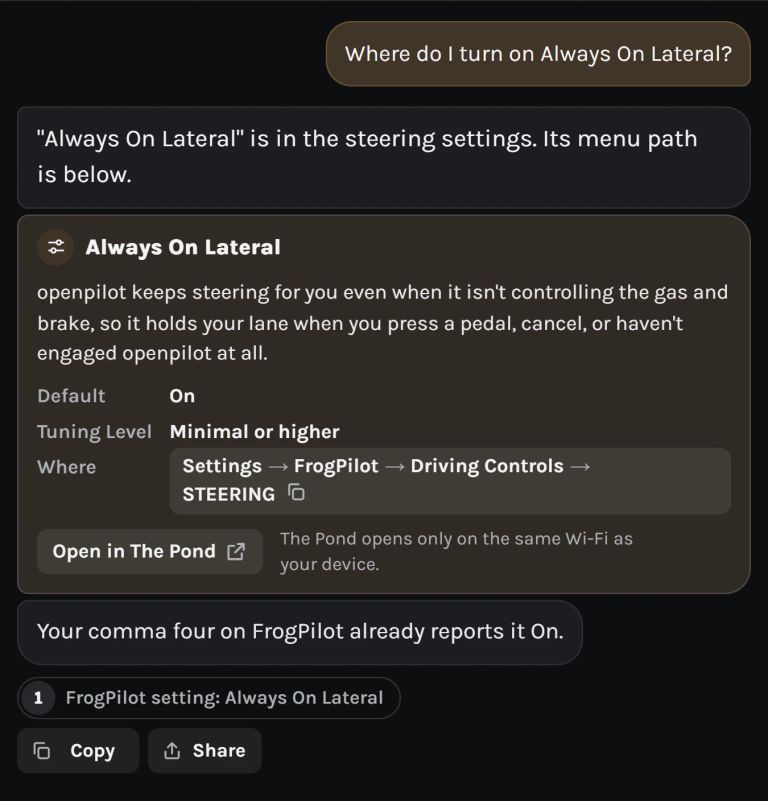
It answers in your language too, with settings named the way your screen shows them, since FrogPilot itself is translated into a bunch of languages.
It doesn’t just guess, either. If your question could mean two things, it asks you one quick question first, and if something isn’t working right, it figures out what’s actually going on before it starts throwing settings at you.
Bug reports and feature requests
Found a bug or have an idea? FrogBot helps you write it up and checks whether someone already beat you to it, so it doesn’t end up as a duplicate. In the Discord, a report or request you file outside the bug report and feature request forums is also posted in the matching forum, with your pictures and logs, where everyone in the server can see it until you delete your FrogBot data.
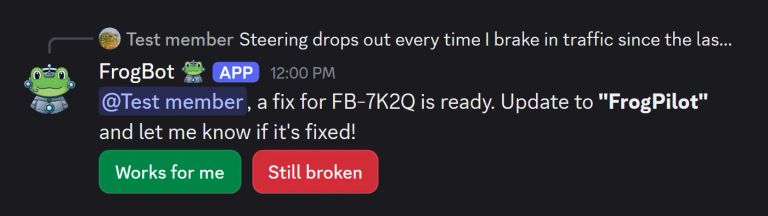
And once a fix is ready to try, FrogBot checks back with everyone who reported the bug or said they hit it too. Update to the branch it names, then tap “Works for me” if it’s fixed or “Still broken” if it isn’t, so it’s clear whether the fix actually worked!
The old FrogBot’s tricks are still here
The first FrogBot’s Discord tricks made the jump too! It still welcomes new members, translates messages in other languages so everyone can follow along, gives you a private summary of a busy channel with /summarize, and reminds you about resolved threads before they’re cleaned up. It plays a mean game of /tictactoe, /frogfact has a frog fact ready for you, and there are a few surprises I’ll let you find on your own.
When something’s serious
If you tell FrogBot you’ve been in a crash or someone’s hurt, it skips the troubleshooting and tells you to call your local emergency number first. Once everyone’s safe, just ask it about the footage and it walks you through saving that drive’s dashcam video with The Pond, FrogPilot’s web app for your device, before the oldest drives get cleared to make room. The Pond opens on any phone or computer on the same Wi-Fi as your device.
Anyone who’s going through a hard time gets a caring answer and a crisis line to reach out to.
On the website, the “Talk to a human” button reaches me directly when you’d rather talk to a person than a bot. I’ll get back to you as soon as I can! FrogPilot is something I build in my spare time, though, so a reply can sometimes take up to a week, and it’s not the place for anything urgent.
Your data, your call
FrogBot sends your questions to Anthropic, the company behind Claude, along with any settings it looks up and, in the Discord, the recent messages from you and the people you’re talking with, along with your display name, so it can write its answers. Anthropic keeps it for up to 30 days, or up to two years if its systems flag it, and doesn’t use it to train its models. Screenshots, photos, text logs, PDFs, and pictures from videos you send go to Anthropic too, and Cloudflare transcribes voice messages and the sound in videos. A driving log you attach to a website report comes only to me and never goes to Anthropic. Website chats are deleted 30 days after your last message unless you turn on “Keep this chat”. Kept chats stay until you delete them or nobody opens them for two years, and if you’re signed in, they stay as long as your account does. If you share a chat, anyone with the link can read a copy of it, without its uploads, and “Stop sharing” ends that.
In the Discord, FrogBot reads messages in every channel it can see, public or private, so it knows when it can help. If you’d rather it didn’t, /frogbot_optout stops it reading your messages to help, though moderation still checks everyone’s messages. Running /frogbot delete wipes what FrogBot keeps under your Discord account, apart from a few notes that keep your choices working, and log entries already written are deleted within 90 days. In the Discord, FrogBot checks your car, device, and branch roles each time it answers, and it also picks those details up on its own from your display name and messages, which it saves to your setup. Your saved setup is deleted 12 months after you last use FrogBot, or right away with /frogbot forget or “Forget my setup” on the website. On the website, you can also delete a chat anytime. The privacy policy has every detail.
Go say hi!
FrogBot is live right now, so go ask it something! Hit “Ask FrogBot” in the corner of any page or mention @FrogBot in the Discord, and see how well it knows your car.
Comments