

October 31st, 2026 Update
"Curve Speed Controller" gets new profiles, FrogPilot reads speed limit signs with its own camera, slowing down gets gentler, and The Pond is rewritten from scratch.
- Release
- FrogPilot v0.9.7
- Published
- Read time
- 32 min
- Views
- Author
FrogsGoMoo
Happy Halloween! Remember when I said the July 4th, 2026 Update was the very last “FrogPilot v0.9.7” update? Yeah, well… I lied. There are actually two more on the way, and this is the first one. The second one comes after FrogPilot v1.0 is out, and it brings v1.0’s improvements to v0.9.7 so v0.9.7 and v1.0 behave nearly identically. That way, anyone who’d rather stay on v0.9.7 still gets all of v1.0’s benefits without having to deal with the changes that come with v1.0.
In my defense, there was way too much to leave on the shelf! The comma device can now read speed limit signs with its own camera, “Curve Speed Controller” was rebuilt from scratch, “Conditional Experimental Mode” got a brain transplant, and “The Pond” was rewritten from the ground up. A new screen also lays out exactly what sharing data with FrogPilot includes so each driver can decide for themselves, and there’s a short list of things worth checking after you update.
A clear choice on data sharing
When the device starts up after this update, it shows a “Help Improve FrogPilot?” screen that spells out exactly what gets shared with FrogPilot and what doesn’t. “Yes, Share Data” helps out, and “No Thanks” keeps driving logs, learned speed limits, and usage stats on the device. None of those are sent until a choice is made, even on devices that were sharing before, and the choice can be changed anytime under Settings → Software → Share FrogPilot Data.
With sharing on, driving logs and learned speed limits only upload while the car is off and connected to an unmetered connection like Wi-Fi, and they’re linked to the device’s FrogPilot ID. Usage stats go out at startup and after each drive on any connection, with the location rounded off to the nearest larger city. In driving logs, exact GPS coordinates are cleared and the VIN field is removed entirely. Full camera footage, audio, and driver camera data never leave the device, but learned speed limits do include where each sign was seen, along with a cropped photo of the sign.
Raw CAN data (the messages the car’s parts send each other) stays in the driving logs to help improve car support, and on some cars those messages can still contain things like GPS, the VIN, or the odometer, so I’d rather be upfront about that now than have anyone find out later. Whichever you pick, the device still registers with FrogPilot and sends crash reports, just like before, but registering no longer sends its IMEI, serial number, or comma device ID. Features that look things up online also send your location when they’re on, whatever you pick here. “Weather Condition Offsets” sends it, rounded to about a kilometer, to FrogPilot or to OpenWeatherMap when using a personal key, and “Use Mapbox as Fallback” sends it to Mapbox.
New “Curve Speed Controller” profiles
“Curve Speed Controller” was rebuilt from the ground up and now spots curves by looking at how hard the road ahead would push the car sideways, factors in how the road is banked, starts easing off before the curve, and smoothly picks the speed back up once the car is through. From my own drives, it takes curves MUCH more naturally than the old version ever did.
The new “Curve Speed Profile” setting picks how fast openpilot takes curves. “Adaptive” learns the driver’s own cornering and is still the default. For anyone who’d rather pick a pace, “Gentle” and “Standard” hold to a fixed, relaxed limit on how hard a curve can push the car sideways, and “Sport” goes right up to the car’s cornering limit, the most FrogPilot allows for it, with none of the profiles ever going past that limit.
The profiles are found under FrogPilot → Driving Controls → GAS / BRAKE → Curve Speed Controller with the “Advanced” Tuning Level, and everyone below that gets “Adaptive” automatically. “Reset Curve Data” wipes what it’s learned for a fresh start.
The learning behind “Adaptive” was rebuilt too. It used to work out how hard the car was cornering from the angle of the steering wheel, pile every moment of every curve into one big average, and jump straight to what it learned after the very first curve. Now it measures how hard the car is actually being pushed sideways, minus how much the road is banked, scores each curve as a whole, and only remembers the last 100 curves, so it keeps up with how the driver drives today. It starts out matching “Standard” and leans further toward the driver’s style with every curve it learns, but it never goes past the cornering limit.
It still only learns from curves where the driver controls the speed with nobody directly in front. It also stops learning from a curve the moment the turn signal comes on, so turning at an intersection or changing lanes won’t throw it off. What it learned before this update can’t carry over to the new method, so it starts fresh from the next drive.
Reading speed limit signs with the camera
FrogPilot could already use the speed limits that some car dashboards read, but only on those cars. Now FrogPilot has officially learned to read too! Well, speed limit signs, anyway. A brand new speed limit sign reader runs right on the device and keeps an eye out for signs through its road camera whenever “Show Speed Limits”, “Speed Limit Controller”, or “Speed Limit Filler” is on, on any car. With “Speed Limit Controller” off, “Show Speed Limits” goes by what the camera reads before any other source.
“Speed Limit Controller” now checks the camera first, then navigation, map data, and the dashboard. The order can be changed under FrogPilot → Driving Controls → GAS / BRAKE → Speed Limit Controller → Speed Limit Source Priority with the “Advanced” Tuning Level, but anyone already at “Advanced” or above keeps their saved order, so “Camera” has to be added there by hand. “Show Speed Limit Sources” now has a “Camera” row too, so you can see what it’s reading before you trust it.
The sign reader is brand new, so it won’t be perfect yet, but I’ve driven over 100 hours with it, and it’s right 99.7% of the time when it posts a limit. It misses roughly 1 sign in 10, mostly at night when headlights wash a sign out. This first version, V1, reads US mph speed limits only, skips conditional limits like school zones, and is still getting better at electronic signs. Other countries and km/h signs are planned for V2, and conditional limits like school zones for V3. It also updates itself over the air in the background, almost daily, so as I collect more data, receive bug reports, and experiment with new modeling techniques, it keeps getting more accurate without needing a FrogPilot update. If it ever completely misses or misreads a sign, please report it in the Discord!
A fully automatic “Speed Limit Filler”
“Speed Limit Filler” used to be a bit of a chore. It collected speed limits from the car’s dashboard, Mapbox, and “Navigate on openpilot” on roads where the map had none or the wrong one, and then it was up to the driver to download the file from “The Pond” and submit it by hand on the Speed Limit Filler website. Now it does the whole thing on its own!
It was rebuilt around the new sign reader. Whenever the camera reads a sign on a road where the downloaded maps have no limit or the wrong one, it remembers that limit for that road and direction and uses it on the next drive there, so the fix doesn’t have to wait on a map update. Once the map catches up and matches the sign, it forgets its own copy.
With “Share FrogPilot Data” on, the limits it learns, cropped photos of the signs, and the roads where the signs matched the map are sent to FrogPilot while parked on an unmetered connection like Wi-Fi, and they’re submitted to OpenStreetMap, so future map downloads and updates get the corrected limits.
It needs downloaded maps, and it’s on for new installs, so on an existing install it has to be switched on under FrogPilot → Maps and Navigation → NAVIGATION → Speed Limit Filler to give it a try.
Gentler slowdowns and acceleration
When there’s no car ahead and openpilot needs to shed some speed, like after the set speed is lowered or a lower speed limit comes up, it now eases off a whole lot more gently. The “Deceleration Profile” options were rebuilt around stock openpilot’s normal cruise braking instead of its hardest braking limit. “Standard” now matches stock openpilot. “Eco”, the default, slows down half as hard as that. “Eco+” pretty much just lets the car coast, using the slope of the road to work out how much it’ll slow down on its own. “Deceleration Profile” needs the “Advanced” Tuning Level, so everyone below that gets “Eco” automatically.
Braking for the car in front got better too. With the default “Eco” profile, openpilot used to hold back on braking for a car ahead until it decided it was really following it, and then ease into its full braking over another second or so. Now it can use its full braking as soon as it spots a car ahead, so it can still stop in time, and the same goes whenever “Experimental Mode”, “Curve Speed Controller”, or a forced stop needs to slow the car down.
The “Acceleration Profile” options got some love too. “Eco” is now gentler pulling away from a stop but has more pep at highway speeds, and “Standard” goes back to stock openpilot’s acceleration. “Sport”, the default, is unchanged. Both profiles live under FrogPilot → Driving Controls → GAS / BRAKE → Acceleration and Braking, “Acceleration Profile” shows at every Tuning Level, and neither profile applies while “Experimental Mode” is running, including when “Conditional Experimental Mode” turns it on, since “Experimental Mode” decides how hard to accelerate and brake on its own based on the current driving conditions.
A smarter “Conditional Experimental Mode”
“Conditional Experimental Mode” switches the car between openpilot’s steady “Chill” mode and “Experimental Mode”, where the driving model picks the speed itself, including slowing for stop lights and stop signs.
But anyways, it got a bit of a brain transplant! The conditions that decide when to switch into “Experimental Mode” were rewritten from scratch, and from my own drives, it now switches over right when it should for slower cars and stop lights. It all lives under FrogPilot → Driving Controls → GAS / BRAKE → Conditional Experimental Mode.
“Lead Detected Ahead” no longer just checks whether the car in front is going slower. It now looks a few seconds ahead at where that car is headed and works out how hard the car would need to brake to keep a safe gap, so it switches over as soon as braking is needed, or when the car ahead is about to come to a stop.
It then holds on until things settle down instead of flip-flopping, and with newer driving models like “Dark Souls”, it even uses the model’s own prediction of where that car is going. It’s off by default, so turn it on with “Slower Lead”, “Stopped Lead”, or both.
“‘Detected’ Stop Lights/Signs” now reacts to milder slowdowns. It switches over when the model plans to drop to about 70% of the current speed within the next few seconds, instead of waiting for a drop to half, and it takes a moment to be sure first. Once it has switched, it holds on until the model’s plan clearly recovers instead of flip-flopping, and it can also switch over when the car is already stopped, as long as the model still wants to stay put. From my own drives, it spots red lights sooner and stops for them more smoothly.
“Turn Signal Below” now also kicks in below the “Minimum Lane Change Speed”, even when there’s a lane alongside. Its “Not For Detected Lanes” option is now off by default, so signaling below the “Turn Signal Below” speed switches over unless that option is turned on with the “Advanced” Tuning Level.
“Capture Recent Footage” and a rebuilt “Screen Recorder”
Something wild happens on the road, and of course nothing was recording. Not anymore! The new “Capture Recent Footage” feature quietly keeps the last minute of the driving screen on hand, and tapping the new blue “CAPTURE” button saves it. It’s on by default, and it can keep anywhere from 30 seconds up to 5 minutes, or be switched off entirely, under FrogPilot → System Settings → DEVICE CONTROLS → Screen Settings → Capture Recent Footage with the “Standard” Tuning Level. Below that level it just stays on.
The “Screen Recorder” got rebuilt too. Instead of making the driving screen draw everything a second time just to capture it, it now hands what’s already on screen straight to the device’s video hardware. That means silky smooth recordings at the same frame rate as the screen itself, without slowing down the driving screen, and each recording is saved as a single file instead of being chopped into 5-minute pieces. A “Recording saved!” alert also shows when it’s done.
Recordings and captured footage both show up under “Screen Recordings” in the “DATA” panel and in “The Pond”. Captures are marked “(Replay)” in the “DATA” panel. Screen recordings are now capped at 10 GB in total, and on the first boot after updating, the oldest ones beyond that are cleared out, so copy anything you want to keep first!
A rewritten “The Pond”
“The Pond” is the set of web pages your device hosts so you can browse drives, recordings, themes, and settings from a phone or computer on the same Wi-Fi or Tailscale network (a private network between your own devices) at ThePond.local. It was rewritten from the ground up, both the part that runs on the device and the pages in the browser. Each page now only loads what it needs when it’s opened, and thumbnails load while scrolling instead of all at once, so it loads a lot less up front and should feel snappier. While I was in there, it picked up a bunch of new tricks.
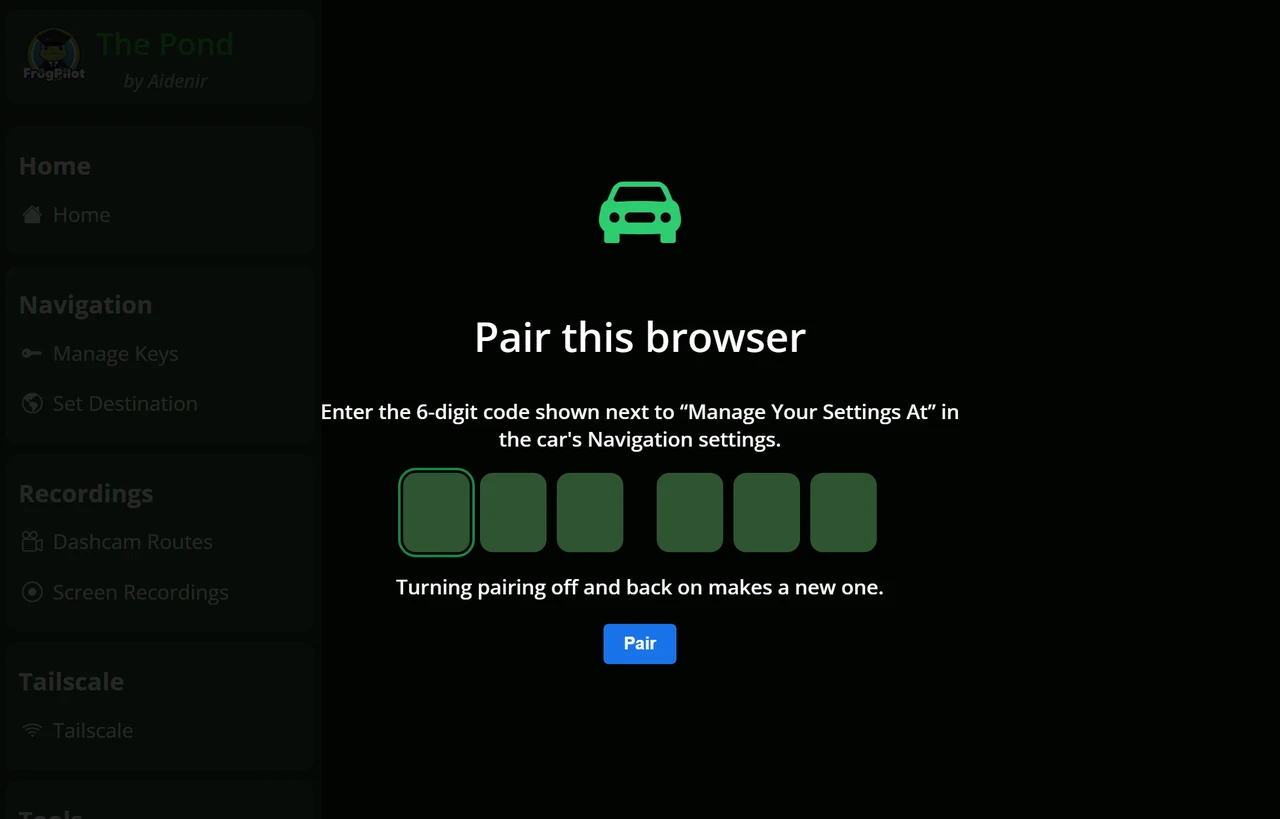
To keep it private, the new “Pairing Code” setting under FrogPilot → Maps and Navigation → NAVIGATION → Pairing Code makes every browser enter a 6-digit code before it can get in. It’s off by default. The code shows right next to “Manage Your Settings At”, and once a browser is paired, it stays paired. Without it, anyone on the same Tailscale or Wi-Fi network can open “The Pond”, so it’s well worth turning on for a device that ever joins a shared network.
Favoriting a dashcam route used to only protect the first minute of it. Oops! Favorites now protect the whole drive, for up to five routes, so the storage cleaner only removes them once there’s nothing else left to clear. “Delete All Routes” was replaced by selecting drives, or “Select all shown”, and deleting them together. The confirmation calls out any favorites, and the drive that’s still being recorded can’t be deleted.
The route player picked up buttons to jump back or forward one minute, switching between the forward, wide, and driver cameras keeps the spot instead of starting the clip over, and only cameras that recorded footage are offered. “Theme Maker” got an overhaul too. It shows previews of images, plays sounds, accepts SVG images, and themes applied from “The Pond” now stick around after a reboot instead of quietly reverting.
More changes to “The Pond”
-
Bug Fix - The “All Time” and “Past Week” distances on the home page were coming up short because of a miles and kilometers mix-up, and now show the right numbers
-
Bug Fix - Dashcam route dates no longer depend on the route’s log, and thumbnails come from a segment that actually has footage
-
Bug Fix - Dashcam routes and screen recordings now load fresh every time their page opens, instead of sometimes getting stuck with a partial list until the browser was reloaded
-
Bug Fix - The drive that’s still being recorded can no longer be deleted, played, preserved, or renamed until it’s finished
-
Bug Fix - “Error Logs” now lists the dated crash logs, not just the latest error
-
Bug Fix - Phones connected to the comma device’s hotspot should be able to browse regular http:// websites again instead of getting sent to “The Pond”
-
Bug Fix - Renaming a favorite destination now keeps its Home or Work tag, the “Favorites” button always shows up, and previous destinations go back to their exact saved spot instead of being searched again
-
Bug Fix - Screen recordings now show a proper date, like “Today, 3:12 PM” or “Mon, Oct 5, 3:12 PM”, instead of the raw file name
-
Bug Fix - Sending a destination now passes along its real name, and sending or clearing one also clears out old waypoints
-
Bug Fix - Switching between comma’s and Konik’s servers no longer shows the other server’s drive stats on the home page
-
Bug Fix - “ThePond.local” should be more reliable to reach now that it answers on every network connection
-
Bug Fix - Videos from “The Pond” are now tagged so Safari on iPhone and Mac should play them
-
Tweak - Converted videos are now capped at 1 GB of cache, so they can’t slowly eat up storage
-
Tweak - The “Keys” page now shows whether each key is “Saved, hidden” or “Not set”, has “Add…”, “Replace…”, “Test”, and “Remove” buttons, can replace a key without deleting it first, checks that keys look like real Mapbox keys, and shows the public Mapbox key masked
-
Tweak - “Lock/Unlock Doors” now only works while the car is off, explains what it’s doing, and shows up on comma 3 devices too
-
Tweak - The “Navigation” page now has “Navigate” and “Cancel destination” buttons, shows a “Route preview” picker when Mapbox has alternatives, says when the keys need checking or it’s still waiting on a GPS signal (instead of quietly centering the map somewhere random), and notes that searches go to Mapbox
-
Tweak - “The Pond” now really locks while driving, with the device refusing requests and stopping open streams, and shows “Connection lost” and reconnects on its own if the connection drops
-
Tweak - “The Pond” now refuses requests from unknown public web addresses, while local names, IP addresses, and Tailscale still work, and uploads are limited to 100 MB
-
Tweak - “Reset Toggles to Default” and “Reset Toggles to Stock” now only run while the car is off, and “Backup Toggles” files no longer include private things like the GitHub username and SSH keys, Mapbox keys, or Toyota security keys
-
Tweak - Route previews on the map now draw routes in plain colors instead of congestion colors
-
Tweak - “Tailscale” now runs as part of FrogPilot instead of as a system service, existing installs move over on their own and stay signed in, and its page has new “Sign in”, “Sign out…”, and “Uninstall Tailscale…” buttons
-
Tweak - “Theme Maker” now has “Apply to car”, “Export”, “Delete theme”, and “Submit theme” buttons, where each theme part can be uploaded or removed. It won’t delete a part that’s in use, and community submissions go straight to FrogPilot for review
-
Tweak - “Toyota Security Keys” never sends saved keys back to the page, and “Apply Key” updates the key file on the device too
A fresh coat of paint
The icons on the driving screen got a makeover! The “Gas / Brake Pedal Indicators”, the “Conditional Experimental Mode” status icons, the weather icons, the curve speed and stop sign markers, and the paused icons were all redrawn so they stay sharp at any size, and the default “Driving Personality Button” icons, for the button that switches between “Aggressive”, “Standard”, and “Relaxed” following distances, got a full redesign.
Most of the holiday themes’ artwork and several “Random Events” steering wheels got the same treatment, and “Random Themes” can now mix holiday themes in with its new “Include Holiday Themes” option.
Almost every setting description was also rewritten in plain language, so it’s easier to tell what a setting does before touching it.
What’s gone
-
Removed - “Destination Search Provider” and the Amap keys, so destination search always uses Mapbox
-
Removed - “Disable openpilot Longitudinal Control” on GM and Honda Nidec cars, since openpilot always handles the gas and brake on them, so cars that had it on now have openpilot in charge of both
-
Removed - “Download Speed Limits” from “The Pond”, since “Speed Limit Filler” now shares what it learns automatically when data sharing is on
-
Removed - “Ford Edge 2022” from the “Car Model” picker, since only the “Ford Fusion Retrofitted 2013-19” uses that platform
-
Removed - “FrogsGoMoo’s Experimental Tune” for GM. Cars that had it on go back to their default stopping and starting behavior
-
Removed - “Human-Like Following” for older driving models. It now follows the model’s own prediction of the car ahead, so it only works with newer models like “Dark Souls”
-
Removed - The “LKAS Button” on Lexus/Toyota TSS-P cars with an SDSU
-
Removed - “Predicted Stop In” from “Conditional Experimental Mode”, since it now always looks ahead by its old default
-
Removed - The “Total Time Tracked” stat from “FrogPilot Stats”
-
Removed - The “Unlimited” Road UI setting, since the path now always reaches as far as the model can see
After you update
-
“Friction” and “Lateral Acceleration” values set by hand on Genesis/Hyundai/Kia and Lexus/Toyota cars only apply while “Force Auto-Tune Off” is on, which needs the “Developer” Tuning Level, so turn it on to keep them
-
A few menus got clearer names. “Longitudinal Tuning” is now “Acceleration and Braking”, “Navigation” is now “Maps and Navigation”, and “WHEEL CONTROLS” is now “WHEEL BUTTONS”
-
Saved settings stay as they are, so new defaults like “Neural Network Feedforward (NNFF) Lite” being on and “Not For Detected Lanes” being off reach new installs, devices after a reset, and anyone below the Tuning Level where the setting is hidden
-
“Speed Limit Filler” is off on existing installs, and at “Advanced” or above, “Camera” has to be added to the sources for “Speed Limit Controller” by hand, so both need doing to try the sign reader
The rest of the changes
These are the smaller changes, mostly for people already running FrogPilot, grouped by where you’ll notice them.
Driving
-
Bug Fix - “Acceleration and Braking” now falls back to stock openpilot’s acceleration, braking, and lead detection when it’s switched off, instead of quietly keeping FrogPilot’s own values
-
Bug Fix - “Always On Lateral” now follows “Enable With Cruise Control”. Before, it steered whenever cruise control was switched on, no matter what that setting said
-
Bug Fix - “Always On Lateral” now pauses at the chosen “Pause on Brake Press Below” speed. A units mix-up made 20 mph act more like 45 mph
-
Bug Fix - “Confirm New Speed Limits” no longer changes the set speed when a cruise button is pressed to accept or deny a new limit
-
Bug Fix - The “Driving Personality Button” on the driving screen now works exactly like pressing the car’s “Distance” button
-
Bug Fix - “Force Auto-Tune Off” now stops openpilot from applying its live-learned steering values, and custom “Friction” and “Lateral Acceleration” values on Genesis/Hyundai/Kia and Lexus/Toyota cars only apply while it’s on, matching when those rows show up
-
Bug Fix - “Force Coast” now coasts by cutting the gas, instead of gently slowing the car down
-
Bug Fix - “Friction”, “Lateral Acceleration”, and “Steer Ratio” values set by hand no longer get saved into what openpilot learns about the car, and learned steering values are only reused on the car they were learned on
-
Bug Fix - Holding the “Distance” button a little too long no longer skips the personality change, unless it’s been assigned a long press action
-
Bug Fix - Holding the − button with a big “Offset Set Speed by:” value could leave the set speed where it was or even raise it. It now always goes down
-
Bug Fix - “Human-Like Following” now falls back to normal following when the model isn’t confident about the car ahead
-
Bug Fix - “Match Speed Limit on Engage” can no longer set a max speed outside what cruise control allows
-
Bug Fix - The “Navigate on openpilot” speed limit now clears when leaving the route or starting a new one
-
Bug Fix - The “Navigation-Based” condition for “Conditional Experimental Mode” now tracks intersections correctly after the first turn of a route, and only treats real left turns, right turns, and U-turns as turns
-
Bug Fix - Fixed a handful of “Neural Network Feedforward (NNFF)” issues, including one where its friction compensation could get stuck at the wrong strength for the rest of the drive. It also prefers the model made for the exact car, and its alert now shows which model it loaded
-
Bug Fix - Turning on “Neural Network Feedforward (NNFF)” no longer switches cars without an “NNFF” model over to the torque controller. Only “NNFF Lite” does that now
-
Bug Fix - “Speed Limit Offsets” now use the right range for 25 mph limits, which were getting the 0-24 mph offset instead
-
Bug Fix - The “‘Taco Bell Run’ Turn Speed Hack” now slows the car down for turns outside “Experimental Mode” with current driving models, where it used to do nothing. It steps aside while “Curve Speed Controller” is on
-
Bug Fix - Turning off a group of settings now puts everything inside it back to stock
-
Tweak - “Always On Lateral” now pauses for anything that would disengage openpilot, including driver monitoring deciding the driver is too distracted
-
Tweak - “Automatic Lane Changes” now starts off on new installs and after resetting settings, “Minimum Lane Width” only applies while it or “Not For Detected Lanes” is on, and the “No Lane Available” alert no longer replaces the normal lane change prompt when “Automatic Lane Changes” is off
-
Tweak - Driving models now use their own steering smoothing and setup from when comma released them, models from before “Tomb Raider” handle the gas and brake in “Experimental Mode” the way they originally did, and older models get the same steering delay stock openpilot gave them
-
Tweak - “Force Stop at ‘Detected’ Stop Lights/Signs” was rebuilt. It kicks in quicker, brakes smoothly to the point where the model wants to stop, and holds the car there until the gas or RES/+ is pressed, with “Holding at a forced stop” and “Stopping in” alerts showing what it’s doing
-
Tweak - “Friction” can now be set anywhere from 0.01 to 1.0, up from 0 to 0.5, and “Lateral Acceleration” can go 50% either way, up from 25%
-
Tweak - “Navigate on openpilot” now only follows the route while “Experimental Mode” is on
-
Tweak - “Neural Network Feedforward (NNFF) Lite” is now on by default and adds friction compensation. On cars that normally steer with PID control and have no “NNFF” model, this also switches them over to openpilot’s torque controller. It sits at the “Advanced” Tuning Level, so everyone below that gets it automatically
-
Tweak - openpilot’s own limit on accelerating mid-turn now applies in gentle curves too, just like stock openpilot
-
Tweak - “Pause Longitudinal” on a wheel button now only switches while openpilot is engaged or already paused
-
Tweak - “Speed Limit Controller” no longer ignores speed limits under 11 mph and holds the car at 11 mph for them instead
-
Tweak - “Steer Into Turns Below Lane Change Speed”, formerly “Force Turn Desires Below Lane Change Speed”, now only kicks in while openpilot is steering and the car isn’t changing lanes
-
Tweak - “Traffic Mode” now keeps a 1-second following distance instead of shrinking it to half a second at a crawl
-
Tweak - “Use Mapbox as Fallback” now needs the Public Mapbox Key instead of the secret one, only asks Mapbox when none of the other sources has a limit, checks at most every 5 seconds, and stops at 100,000 requests a month
-
Tweak - “Weather Condition Offsets” now treats squalls and tornadoes as rainstorms, rechecks the weather after about 12 miles of driving instead of 25 km, rounds the location before sending it, and talks to OpenWeatherMap directly when using a personal key. “Reduce Speed in Curves by:” is now “Reduce Cornering Force by:”
Vehicle support
-
Added - Ram 1500 2019-24 trucks with older steering firmware (version 6831 or earlier) can now engage at any speed, thanks to RealFast!
-
Bug Fix - Acura RDX 2019-24 and Honda Clarity vehicles should fingerprint more reliably now that firmware openpilot only logs no longer gets in the way
-
Bug Fix - The Chevrolet Trailblazer No-ACC 2021-22 was missing steering data openpilot needs to start up, so it now borrows the regular Trailblazer’s
-
Bug Fix - Ford and Lincoln vehicles now fully let go of the wheel when the driver steers hard past 60 degrees, instead of just asking for a straight path
-
Bug Fix - The Ford Fusion Retrofitted 2013-19 no longer risks crashing at startup before its steering angle sensor reports in
-
Bug Fix - Ford, Lexus, and Toyota dashboard speed limits now ignore impossible readings instead of passing them along
-
Bug Fix - Genesis G90 2017-20 steering now stays within stock openpilot’s torque limit
-
Bug Fix - Genesis/Hyundai/Kia dashboard speed limit messages are now optional, so a car that doesn’t send them no longer counts that as a fault, and HDA1 cars on CAN-FD are detected on the right bus
-
Bug Fix - Lexus GS F, IS, and RC vehicles now read main cruise from the right message, which lets “Always On Lateral” see when cruise control is switched on
-
Bug Fix - Lexus/Toyota cars that need a SecOC key now start in dashcam mode when no valid key is saved, instead of trying to steer with messages the car would reject, and a typo in the key no longer crashes startup
-
Bug Fix - Lexus/Toyota cruise +/- presses now count once per press on every model, instead of repeating many times a second on some and not registering at all on others
-
Bug Fix - Lexus/Toyota TSS2 vehicles now catch quick repeat presses of the LKAS button, and models with radar ACC and no SDSU register it at all now
-
Bug Fix - Lexus/Toyota TSS2 vehicles with radar ACC no longer lose ACC entirely when “Disable openpilot Longitudinal Control” is on
-
Bug Fix - Lexus/Toyota vehicles with a “ZSS (Zorro Steering Sensor)” now ignore stale readings from it, and SecOC cars skip it entirely. Credit for ZSS support goes to Erich!
-
Bug Fix - Mazda and Nissan vehicles now catch every press of the LKAS button
-
Bug Fix - Ram 1500 steering now comes back whenever the truck is above its engage speed, instead of only inside a narrow window just above it
-
Bug Fix - Ram 2500/3500 trucks now read ACC faults the same way stock openpilot does
-
Bug Fix - The Subaru “Stop and Go” setting now shows up, the car’s own throttle and brake messages only get blocked while openpilot is sending its own, and resuming from a stop waits the full time it should
-
Bug Fix - Tesla vehicles with “Disable openpilot Longitudinal Control” on no longer have the car’s safety checks expecting openpilot to control the gas and brake
-
Tweak - Chrysler and Ram dashboard LKAS icons are back to how stock openpilot shows them
-
Tweak - Genesis/Hyundai/Kia dashboards now keep the lane assist icon lit the whole time openpilot is engaged, not just while it’s steering
-
Tweak - The Genesis/Hyundai/Kia “‘Taco Bell Run’ Torque Hack” was retuned and now goes through the same safety checks as normal steering
-
Tweak - Genesis/Hyundai/Kia vehicles with an LFA button can now use “Enable With LKAS” with or without openpilot controlling the gas and brake, and it’s on by default. While it’s on, the LKAS button no longer runs the “LKAS Button” action, so it can be turned off with the “Advanced” Tuning Level to keep that action
-
Tweak - On Genesis/Hyundai/Kia vehicles with an LFA button, “Always On Lateral” starts every drive switched off, so it takes one press of the LKAS button after starting the car, and pressing it again switches it back off
-
Tweak - GM cruise-only cars with a comma pedal, like the Chevrolet Bolt No-ACC and Volt, got a new pedal tune, and “Smooth Pedal Response on Hills” is now off and hidden on every No-ACC car
-
Tweak - Honda “Increased Braking Force” now adds a little extra braking at low speeds to hold back the car’s creep
-
Tweak - Honda Nidec vehicles with a comma pedal now accelerate at up to 1.6 m/s², stock openpilot’s limit for Nidec cars, instead of 3.0 m/s²
-
Tweak - Honda vehicles that turn cruise control off just above their engage speed now show the stock “Cruise Is Off” alert
-
Tweak - Lexus/Toyota “DSU Re-Route Harness” is no longer offered on cars that don’t have a DSU, like the C-HR 2017-20 and Camry 2018-20
-
Tweak - Lexus/Toyota TSS-P vehicles without a comma pedal now use stock openpilot’s longitudinal tune for non-TSS2 cars, with acceleration capped at 1.5 m/s². The higher limits and faster stopping now only apply to TSS2
-
Tweak - Lexus/Toyota vehicles with an SDSU no longer get a lower engage speed unless the car supports stop and go, so cars like the Corolla 2017-19 need “Stop-and-Go Hack” to engage below about 19 mph
-
Tweak - Lexus/Toyota vehicles with an SDSU and stop and go and a comma pedal now tap the gas to pull away whenever openpilot asks to accelerate
-
Tweak - Lexus/Toyota vehicles with the DSU unplugged now hide “Disable openpilot Longitudinal Control”, unless it’s already on
-
Tweak - The “LKAS Button” setting now only shows on cars that actually have one. That’s Chrysler, Ford, GM, Honda, Mazda, and Nissan, plus Genesis/Hyundai/Kia with an LFA button and Lexus/Toyota TSS2
-
Tweak - Nissan dashboards now keep the steering icon and lane lines lit the whole time openpilot is engaged, not just while it’s steering
-
Tweak - Subaru dashboards now turn green while openpilot is engaged and show lane lines while “Always On Lateral” is steering
-
Tweak - The supported car list and “Car Model” picker got clearer names, like “Chevrolet Trailblazer No-ACC 2021-22” and “Nissan Leaf Instrument Cluster 2018-23”
-
Tweak - When fingerprinting fails, openpilot now only falls back to the last car it saw if the VIN matches, “Car Make” shows “GMC”, “SEAT”, and “Škoda” properly, and a stale “Car Model” is cleared when a different car is detected
Visuals and interface
-
Added - “Always-On Driver Monitoring” is back under
Settings → Toggles -
Added - New cloudy day and night icons for “Weather Condition Offsets”, which used to show the clear sky icon on cloudy days
-
Bug Fix - “Adjacent Lanes” now draws its paths in the actual lanes alongside
-
Bug Fix - The Christmas and Thanksgiving disengage sounds are louder, so they can be heard
-
Bug Fix - comma prime users get their destinations panel back on the home screen and their map back on the driving screen, and the map no longer mixes up units for turns under 500 feet
-
Bug Fix - The crash notice and the “Ferg” random event no longer take the place of real alerts
-
Bug Fix - The crash screen’s “Restore” button no longer wipes the FrogPilot install when there’s no previous version to restore. It now says “Reboot” instead
-
Bug Fix - “Disable Automatic Fingerprint Detection” now only shows with the “Advanced” Tuning Level, as intended, instead of also showing at “Standard”
-
Bug Fix - “Distance Driven This Month” in “FrogPilot Stats” now starts over when a new month begins
-
Bug Fix - The “Driving Personality Button” is centered and can no longer get stuck held down
-
Bug Fix - “Dynamic Path Width” now stays full width in “Traffic Mode”
-
Bug Fix - “Full Map” no longer covers up alerts
-
Bug Fix - “Hide Non-Critical Alerts” was hiding every alert banner, including warnings and takeover requests. It now only hides the informational ones, like calibration, lane changes, and turns
-
Bug Fix - Lane and path widths now convert properly when switching between metric and imperial
-
Bug Fix - “Model Stopping Point” now shows the real distance to where the model plans to stop, and stays off the driver camera
-
Bug Fix - Nothing gets drawn over the driver camera anymore, and settings close themselves when the reverse camera comes up
-
Bug Fix - “Random Events” got a few fixes. The déjà vu curve event now plays on right curves too, the “Noice” event triggers on a rounded 69, and the steering wheel goes back to normal afterward
-
Bug Fix - Settings that need a reboot now say “Disengage to Reboot” while openpilot or “Always On Lateral” is steering, and “High-Quality Recording” and “Use Konik Server” no longer reboot the device out of nowhere
-
Bug Fix - Small and mid-size alert text now shrinks to fit instead of running off the edge
-
Bug Fix - “Stopped Timer” now fades smoothly from green to yellow to red
-
Bug Fix - “Use Vienna-Style Speed Signs” now hides the offset once the limit is overridden, never draws on top of the US-style sign, and its “PENDING” sign is easier to tap
-
Bug Fix - The Valentine’s Day and St. Patrick’s Day greetings now show up
-
Bug Fix - The Wi-Fi upload prompt no longer claims uploads are off when only onroad uploads are disabled
-
Tweak - “Adjacent Path Metrics” is now “Adjacent Lane Metrics”
-
Tweak - “Alert Volume Controller” is now “Alert Volumes” with clearer names for each sound, “Distracted Driver Volume” and “Prompt Volume” can’t go below 25%, and the test sound plays at the chosen volume. “FrogPilot Alerts” is now “Extra Alerts”, and the loud blind spot alert is now “Louder Blind Spot Alert”
-
Tweak - The “Conditional Experimental Mode” status widget got new icons, including ones for each turn signal and for speed limits, and stays in one spot
-
Tweak - The “Curve Speed Controller” widget now shows its curve speed relative to the displayed speed, centered, and hides while stopped
-
Tweak - The “DATA” panel’s “Toggle Backups” is now “Settings Backups”, “Delete Driving Data” keeps the routes favorited in “The Pond”, FrogPilot backups are always compressed, and restoring a backup checks for free space first and won’t run while the car is on
-
Tweak - “DRIVING MODEL” can now download and delete several models at once
-
Tweak - Each settings panel now opens with its descriptions expanded the first time it’s visited
-
Tweak - Extra alerts like “Green Light Alert” and “Lead Departing Alert” got pickier about when they fire, and FrogPilot’s alerts can now step in front of less important stock ones
-
Tweak - “FrogPilot Stats” got clearer names, like “Time Driving Manually”, “Time openpilot Was Steering”, and “Total Collision Alerts”, and its “RESET” button only works while the car is off
-
Tweak - Holiday turn signal animations play a little slower, can now use vector frames, and draw above the road name
-
Tweak - “Lead Info” now works without openpilot controlling the gas and brake, was redesigned with stacked lines, and shows the desired following distance when openpilot controls the gas and brake
-
Tweak - “MAP DATA” now prompts for map sources to be picked, “Remove Maps” clears them too, and “Reset Downloader” won’t run while openpilot is engaged
-
Tweak - The model rating card on the home screen got a redesign and now rates the model the drive started with
-
Tweak - Paused icons and the “Compass” now sit in fixed spots, and the compass gets its heading from the planner
-
Tweak - The “Personality Button” list in “Custom Themes”, formerly “Distance Button”, now hides packs that don’t have their own icons, and theme downloads can pick several at once, with progress and a “CANCEL” button
-
Tweak - “You’ve Got Mail” now needs “Always On Lateral” to be on, and most of the random event wheels were redrawn
-
Tweak - “Road Name” now cuts off long names cleanly, hides during alerts, and sits a little higher
-
Tweak - Screen brightness changes now apply right away
-
Tweak - The screen now wakes up for FrogPilot’s alerts, and the first tap on a dark screen only wakes it
-
Tweak - Tapping “Sidebar Metrics” now cycles through them only with “Developer Metrics” on, and their labels fit better
-
Tweak - Some holiday themes got new sidebar colors, and the default theme is refreshed every boot so it always has the latest art
-
Tweak - The steering effort border is now hidden on cars that steer by angle
-
Tweak - The stock “Experimental Mode” toggle is hidden while “Conditional Experimental Mode” is on, since it’s in charge
-
Tweak - “Tuning Level” now asks for confirmation before switching to “Developer”, offers a reboot when a change needs one, and an unconfirmed level used to count as “Developer” but now counts as “Advanced”
-
Tweak - “UTILITIES” got clearer names like “Reflash the Panda” and “Reset Settings to Default”, and “Force Drive State” now needs the “Developer” Tuning Level and refuses while openpilot is steering or the car is on
-
Tweak - Warnings never play quieter than the automatic volume
Stability and polish
-
Bug Fix - Automatic updates no longer get stuck waiting forever after a failed check, install an update that’s already downloaded the next time the car is off, and won’t reboot the device in the middle of restoring a backup
-
Bug Fix - Bug reports are now retried every minute until they go through, as long as the device stays on, instead of being lost when the connection drops
-
Bug Fix - Driving logs are now fully finished before anything tries to upload them
-
Bug Fix - “FrogPilot Stats” now saves at the end of every drive, and “Total Frog Hops” counts hops now
-
Bug Fix - Low storage cleanup now clears the oldest drives across all the recording folders, including “High-Quality Recording” and Konik ones, and clears the routes favorited in “The Pond” last
-
Bug Fix - “Model Randomizer” now sticks with the same model for the whole drive and picks a new one when the drive ends, and the default model is now in the mix
-
Tweak - Automatic updates, theme updates, map updates, and automatic model downloads now only happen on unmetered connections, and an automatic model download stops if the connection becomes metered
-
Tweak - Bundled driving models are now linked instead of copied, freeing up storage
-
Tweak - Crash reports no longer include the values of variables from inside the code
-
Tweak - Map updates now follow local time, and the map data service now comes with FrogPilot instead of being downloaded
-
Tweak - “Raise Temperature Limits” now only raises the yellow and red points, where red disengages openpilot, instead of shifting every temperature band
-
Tweak - Resetting settings on the device no longer wipes “FrogPilot Stats”, the Toyota security key, learned values, or “The Pond” pairing, and FrogPilot backups check that there’s enough free space before they start
That’s the first of the two! The second one comes after FrogPilot v1.0 and brings v1.0’s improvements back to v0.9.7, and if anything here misbehaves, I’d love to hear about it in the Discord. Thanks for riding along!